
HomePage | Optical Illusions | War Stories | QBasic | Dads Navy Days | Bristol | Bristol, USA | Bristol, Canada | Terre Haute | Miscellany | Web Stuff | About Ray | Site Map | Site Search | Messages | Credits | Links | Web Rings
QBasic | Errors | 40lb Weight | Bits | Chance | Colours | Dates | Delays | File Dialog | Files | Input | Matching | Menus | Mouse | Numbers | SeqNo | SIRDS | Sorts | Text | Timer | DLoads
SIRDS - Single Image Random Dot Stereograms
Trust me! I must have been the last person in the world to know how to view these images, and that was only with Patty's help. Not only that, but just as I managed to be able to see the hidden images then everyone else started getting bored with them. So this is a piece of (very) retro programming!!
This page is for Patty Waltermire who showed me how to view the images and who has a huge collection of Magic Eye pictures.
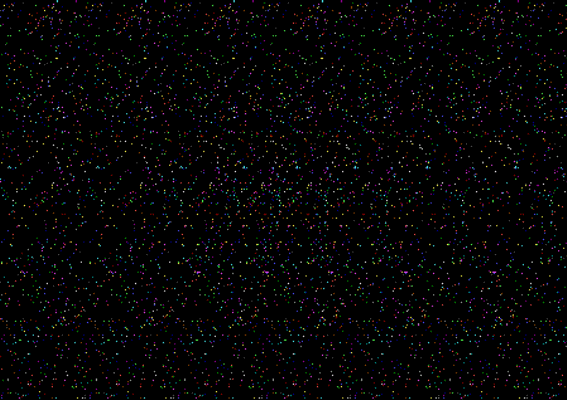
Cone SIRD ~ Screenshot
SIRDS - What they are and how to view them
Each of our eyes sees a very slightly different view of the world, this difference is only roughly 1.5 inches but it's enough to give us stereoscopic vision. The smaller the difference between these two images the closer the image must be to us. SIRDs images are made up of repeating patterns, but there are subtle differences in each pattern. By forcing your eyes to superimpose these patterns on top of eachother then the differences in them are interpreted as a 3D image.
To view the stereograms it is neccessary to focus your eyes, usually at a point behind the screen, so that the left eye is looking through one pattern of dots and the right is looking through a neighbouring pattern. The difference in the patterns is what produces the 3D effect.
The program allows you change the settings for the dot patterns. The variable InterOc allows changes in the Interocular Gap. That is the distance between the dot clusters. Density allows you to change the number of dots in an area of the screen. More dots can enhance the 3D effect, but the larger number of dots in the background can be distracting which means that you can lose focus. Height and VirtZ controls the "height" of the object, the "depth" of the 3D object. Polarity controls the Polarity of the image, i.e. whether it advances or recedes from you. Shape controls which shape is displayed.
'SIRDS.BAS      January 2001

'Programming by Ray Thomas      Mathematics by Patty Waltermire

'A program to produce Single Image Random Dot Stereograms

Density = 1000
InterOc = 70
Polarity = 0
VirtZ = 10
Shape = 3
PixCorrn = .5

'*** Shape 0 is the background only ***
'*** Shape 1 is a rectangle ***
'*** Shape 2 is a circle ***
'*** Shape 3 is a cone ***
'*** Shape 4 is a hemisphere ***
'*** Shape 5 is a torus ***

CLS
SCREEN 9
InitZ = VirtZ

'*** Create Density number of random coloured dots ***
'*** in a vertical strip InterOc wide ***

RANDOMIZE TIMER
FOR Count = 1 TO Density
        PosnX = (RND * InterOc) + 1
        PosnY = (RND * 350) + 1
        Colour = (RND * 15)
        PSET (PosnX, PosnY), Colour
        GOSUB DoOffSet
NEXT Count

END

DoOffSet:

' *** Redraws the dots across the screen

WHILE PosnX < 640
        GOSUB CalcZ
        IF Polarity = 0 THEN VirtZ = -VirtZ
        PosnX = PosnX + InterOc + VirtZ
        IF PosnX < 640 THEN PSET (PosnX, PosnY), Colour
WEND
RETURN

CalcZ:

'*** Calculates the virtual Z co-ordinate

VirtZ = 0
'*** Centre of screen is at 320,175 ***
'*** PixCorrn is to correct for the fact ***
'*** that screen pixels are not square ***

Dist = SQR(((PosnX - 320) * PixCorrn * (PosnX - 320)) + ((PosnY - 175) * (PosnY - 175)))

'*** Shape 1 is a rectangle ***
IF Shape = 1 THEN
        IF PosnX > 220 AND PosnX < 420 THEN
                IF PosnY > 100 AND PosnY < 250 THEN
                        VirtZ = InitZ
                END IF
        END IF
END IF

'*** Shape 2 is a circle ***
IF Shape = 2 THEN
        Rad = 100
        IF Dist < Rad THEN VirtZ = InitZ
END IF

'*** Shape 3 is a cone ***
IF Shape = 3 THEN
        Rad = 100
        Height = 40
        Result = (Rad - Dist) * (Height / Rad)
        IF Result > 0 THEN VirtZ = Result
END IF

'*** Shape 4 is a hemisphere ***
IF Shape = 4 THEN
        Rad = 60
        IF Dist < Rad THEN
                Result = SQR((Rad * Rad) - (Dist * Dist))
                VirtZ = Result / (PixCorrn * 10)
        END IF
END IF

'*** Shape 5 is a torus ***
IF Shape = 5 THEN
        IntRad = 40
        ExtRad = 100
        DiffRad = ExtRad - IntRad
        IF Dist > IntRad AND Dist < ExtRad THEN
                Result = SQR((DiffRad * DiffRad) - ((Dist - DiffRad) * (Dist - DiffRad)))
                VirtZ = Result * PixCorrn
        END IF
END IF
RETURN
I've written about how to view and how SIRDS work in the Optical Illusion section of the site.
The sites listed below show exactly how these images are produced and also the type that are produced from repeated images.
Other sites of interest
Another list of SIRDs programs
QBasic | Errors | 40lb Weight | Bits | Chance | Colours | Dates | Delays | File Dialog | Files | Input | Matching | Menus | Mouse | Numbers | SeqNo | SIRDS | Sorts | Text | Timer | DLoads
HomePage | Optical Illusions | War Stories | QBasic | Dads Navy Days | Bristol | Bristol, USA | Bristol, Canada | Terre Haute | Miscellany | Web Stuff | About Ray | Site Map | Site Search | Messages | Credits | Links | Web Rings
This page was last updated on 24th October 2003
