
HomePage | Optical Illusions | War Stories | QBasic | Dads Navy Days | Bristol | Bristol, USA | Bristol, Canada | Terre Haute | Miscellany | Web Stuff | About Ray | Site Map | Site Search | Messages | Credits | Links | Web Rings
QBasic | Errors | 40lb Weight | Bits | Chance | Colours | Dates | Delays | File Dialog | Files | Input | Matching | Menus | Mouse | Numbers | SeqNo | SIRDS | Sorts | Text | Timer | DLoads
Text Manipulation:
QBasic contains some very good text manipulation functions. Most are covered in the help file.
Now and again it's useful to extract words from strings. The following code will do this, and put the words into an array. It is part of a longer program, Parse.bas, that is available on the downloads page. It uses INSTR to look for the spaces in the string and then extract the word.
'Parse          Ray Thomas      February 2002

OPTION BASE 1

DIM LongStr AS STRING           'Your string
DIM StrArray(10) AS STRING      'Array to hold split text
DIM Num AS INTEGER              'Holds the space position
DIM OldNum AS INTEGER           'Holds the old space position
DIM StrLen AS INTEGER           'The number of characters between spaces
DIM Count AS INTEGER            'General counter

Num = 0
OldNum = 1
Count = 1
LongStr$ = "My name is Ray and I wrote this"

CLS

DO
        Num = INSTR(Num + 1, LongStr$, " ")
        StrLen = Num - OldNum
        IF Num > 0 THEN
                StrArray$(Count) = MID$(LongStr$, OldNum, StrLen)
        ELSE
                StrArray$(Count) = MID$(LongStr, OldNum)
        END IF
        Count = Count + 1
        OldNum = Num + 1
LOOP UNTIL Num = 0
Animating Text:
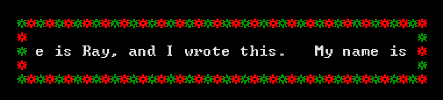
The following program, Ticker.bas, produces a ticker type or scrolling display of text.
'Ticker         Ray Thomas      February 2002

'A program to produce a ticker tape effect

DIM TickStr AS STRING
DIM LongStr AS STRING * 40
DIM LenStr AS INTEGER
DIM CountTxt AS INTEGER
DIM CountDly AS LONG
DIM CountSrnd AS INTEGER
DIM XSurround AS INTEGER
DIM YSurround AS INTEGER

'*** set variables and constants ***

TickStr$ = "My name is Ray, and I wrote this.   "
LongStr$ = TickStr + TickStr
LenTick = LEN(TickStr$)
LenLong = 40
CountTxt = 0
CountDly = 0
XSurround = 18
YSurround = 7

CLS

DO
   '*** Do the surround ***

   XSurround = 18
   YSurround = 7
   CountSrnd = 0

      DO
         LOCATE YSurround, XSurround
         CountSrnd = CountSrnd + 1
         IF CountSrnd >= 0 AND CountSrnd < LenLong + 4 THEN XSurround = XSurround + 1
         IF CountSrnd >= LenLong + 4 AND CountSrnd < LenLong + 8 THEN YSurround = YSurround + 1
         IF CountSrnd >= LenLong + 8 AND CountSrnd < (2 * LenLong) + 11 THEN XSurround = XSurround - 1
         IF CountSrnd >= (2 * LenLong + 11) THEN YSurround = YSurround - 1
         COLOR 2
         IF CountSrnd MOD 2 = 0 THEN COLOR 12
         PRINT CHR$(15);
      LOOP UNTIL CountSrnd = (2 * LenLong) + 14

      '*** Print the text ***

      LOCATE 9, 20
      CountTxt = CountTxt + 1
      IF CountTxt = LenTick + 1 THEN CountTxt = 1
      LongStr = MID$(TickStr$, CountTxt) + TickStr$
      COLOR 7
      PRINT LongStr$

      '*** Delay Loop ***

      CountDly = 0

      DO
         CountDly = CountDly + 1
      LOOP UNTIL CountDly = 400000

   LOOP UNTIL INKEY$ <> ""

END
The program makes use of the fact that you can specify a string to be a fixed width. This is done in the line
DIM LongStr AS STRING * 40
Most of the program is taken up with drawing the surrounding border and a delay loop to stop the text looking so jerky as it moves across the screen. The alternating colours in the border are produced by the lines ...
COLOR 2
IF CountSrnd MOD 2 = 0 THEN
COLOR 12
The color is set to two and then if the MOD 2 of CountSrnd (a counter of the number of stars in the border) is equal to 0 then the colour is changed. The MOD of a number is a simple division between two numbers with MOD returning the remainder. So 4 MOD 3 would be 1, and 6 MOD 4 will be 2.
The scrolling text is produced by the lines ...
LOCATE 9, 20
CountTxt = CountTxt + 1
IF CountTxt = LenTick + 1 THEN CountTxt = 1
LongStr = MID$(TickStr$, CountTxt) + TickStr$
COLOR 7
PRINT LongStr$
What they do is move through the text one letter at a time and adding a complete string of the same text to it. As the length of the string variable is set at 40, not all the text will fit into the variable and is discarded. The variable, LongStr, is then repeatedly printed to the screen, this gives the impression of scrolling text.
QBasic | Errors | 40lb Weight | Bits | Chance | Colours | Dates | Delays | File Dialog | Files | Input | Matching | Menus | Mouse | Numbers | SeqNo | SIRDS | Sorts | Text | Timer | DLoads
HomePage | Optical Illusions | War Stories | QBasic | Dads Navy Days | Bristol | Bristol, USA | Bristol, Canada | Terre Haute | Miscellany | Web Stuff | About Ray | Site Map | Site Search | Messages | Credits | Links | Web Rings
